

Run it by asking.
Ask AI sets up campaigns, flows, scripts and reports from a sentence — inside the console, or from Claude.
Three things it does well.
- 1
Ask
"Call yesterday's unconnected leads at 10am."
- 2
Review
Ask AI shows what it will change.
- 3
Approve
Nothing is saved until you approve.
Ask a question. Or ask for a change.
Questions are answered from your live console data. Changes come back as a card to approve — pick one and watch.
- 1You askIn plain words, in the console or from Claude
- 2It looks it upUsing your role’s tools, and shows which
- 3You get the answerCharts, metrics and tables from live data
Type it the way you would say it.
A few things teams ask, by the part of the product they touch.
- “Call yesterday’s unconnected leads at 10am.”
- “Call back every number that didn’t connect today.”
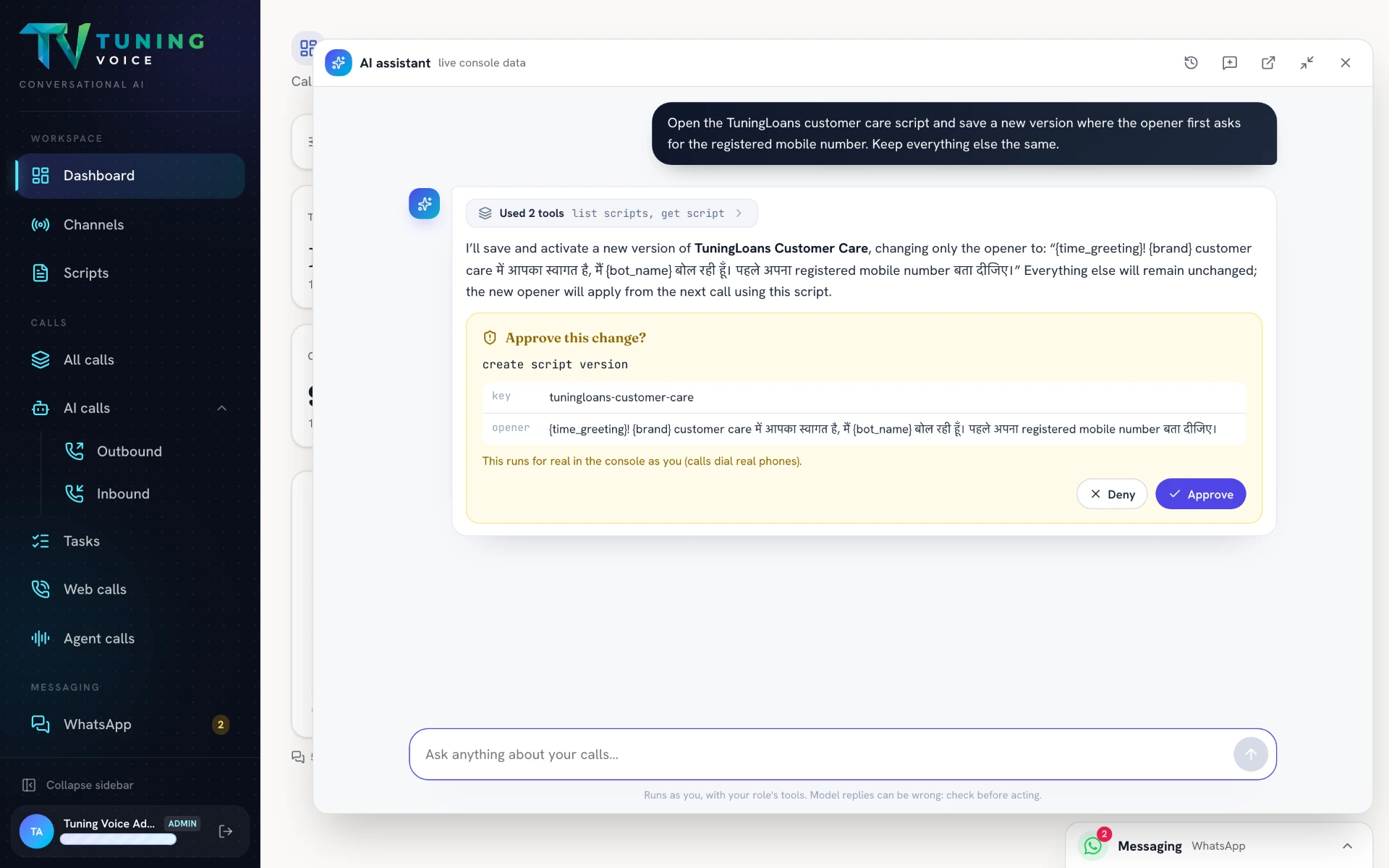
- “Change the opener to ask for the registered mobile number first.”
- “Show me the versions of the support script.”
- “After every interested lead, send a WhatsApp recap.”
- “Draft a flow that calls new website leads.”
- “Add a rubric: the agent must confirm the payment date.”
- “Which calls missed the closing check this week?”
It works for you. Not around you.
It works with your role’s tools, so it can only do what your account is allowed to.
Every answer lists the tools it used to get there.
Changes come as a card showing exactly what will change. Nothing is saved until you approve.
A script change is saved as a new version; earlier versions stay, and you choose which is active.
- Opens over any page, with live console data
- Conversation history and new chats
- Pop it out into its own window
- Use Ask AI without opening the console
- It can only do what your account is allowed to
- It asks before it changes anything
Watch the walkthrough.
Real product screens.
One screen at a time — scroll on desktop, swipe on your phone.
- 01
Review the change before it runs
Ask AI prepares a script change and presents it for approval before saving and activating the new version.
Everything in it.
- Campaigns from a sentence
- Flows and scripts drafted for you
- Reports and dashboards on request
- Asks for approval before changes
- Respects account roles
- Claude connector
Questions about this.
Can it change things without me?
No. It shows the change and waits for your approval, and it can only do what your account is allowed to.
Does it work outside the console?
Yes, from Claude through our connector.